Hydra Check-in 1.0.2 and Hydra Bridge 1.0.1 updates
Before we being, to take advantage of the features described in this post, make sure you’re running the latest versions of both Hydra Check-in and Hydra Bridge.
Some of the improvements introduced here depend on communication between the app and the plugin. Updating only one side may result in certain features not being available.
Hydra Check-in 1.0.2 is available now on all supported platforms.
Hydra Bridge can be updated from your WordPress dashboard or downloaded from your Hydra Account.
In short: Update both.
Let’s get into it
Hydra is still young.
Which is both exciting and slightly terrifying.
The good news is that being early also means we get to move fast, listen closely and improve things before habits become features and features become impossible to change.
Over the past weeks we’ve been working on a collection of improvements across both Hydra Check-in and Hydra Bridge. Some of them are visible immediately. Others sit quietly in the background until the day you actually need them.
Let’s take a look.
Built for real-world check-in.
See plans and choose what fits your workflow.
Hydra now speaks more languages
One of the most common requests since launch was simple:
“Can Hydra speak my language?”
Starting today, Hydra Check-in includes support for:
- Spanish
- Portuguese (Brasil)
- French
- German
- Italian
- Dutch
- Polish
- Swedish
- Danish
- Norwegian (Bokmål)
A special thank you goes to Matthias, who contributed the Dutch translation.
The remaining translations are a combination of community feedback, our own language knowledge and AI-assisted verification. While we’ve done our best to make everything accurate, language is tricky. Sometimes very tricky.
If you find an awkward phrase, a strange translation or something that simply doesn’t make sense, please let us know.
We’ll gladly fix it.
Speaking of translations, we’re actively looking for contributors. Anyone helping improve Hydra translations is eligible for substantial license discounts, including discounts on lifetime licenses.
What about date and time formatting?
Good question.
Adding languages does not change how dates and times are formatted.
Hydra continues to follow the operating system settings of the device it’s running on. If your device uses a 24-hour clock, Hydra will use a 24-hour clock. If your device displays dates as DD/MM/YYYY, Hydra will do the same.
The only noticeable difference appears when a month name is displayed in textual form.
For example:
- June
- Juni
- Juin
- Giugno
Those month names now follow the language selected inside Hydra.
Everything else remains consistent with your device preferences.
Device naming finally arrives
If you’ve ever managed multiple devices during an event, you already know the problem.
Which one was Tablet #3 again?
Starting with Hydra Check-in 1.0.2, devices can now be given custom names during login.
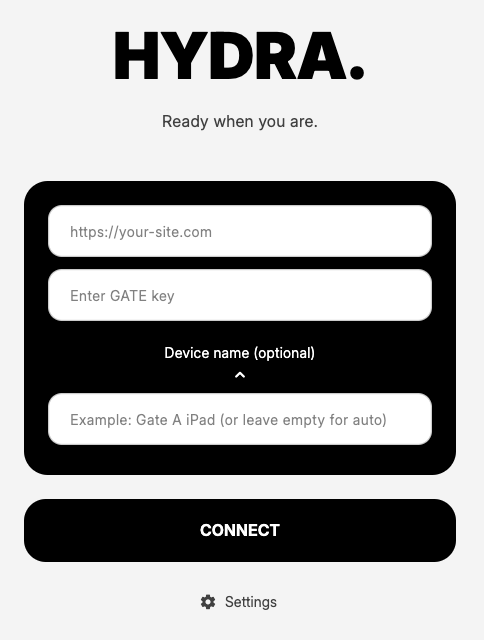
Instead of guessing which device belongs where, you’ll now see names such as: Front Gate iPad, VIP Entrance Tablet, Registration Desk, Backstage Scanner or literally anything else you come up with. And even if you leave this field empty, Hydra will automatically generate device name and will try to make it somewhat meaningful.
These names are also visible within Hydra Bridge Settings -> Telemetry, making it significantly easier to identify devices during live events. Requires version 1.0.1 of Hydra Bridge.
Sometimes small features save surprisingly large amounts of confusion.
Protecting settings from curious fingers
Hydra has always been built around a privacy-first philosophy.
With the latest Hydra Bridge update, administrators can now require a fallback PIN before app settings can be accessed.
You’ll find the option here:
Settings -> General -> Require fallback PIN to access app settings
When enabled, operators can continue using Hydra normally, but entering the settings area requires the fallback PIN configured inside Hydra Bridge.
The practical benefit is simple.
- Attendee visibility settings remain under administrator control.
- Privacy settings remain under administrator control.
- Random experimentation remains significantly reduced.
Every event organizer eventually encounters the famous question: “What does this button do?”
Now you can answer: “Nothing. You don’t have the PIN.”
We can’t help with the same question for the sound engineer though. Sorry.
Faster device termination
Hopefully you never need this feature. But if you do, you will be glad it’s there (don’t ask how we know).
Within Telemetry area in Hydra Bridge settings you can now immediately terminate a connected device when used together with Hydra Check-in 1.0.2.
After termination, the device is logged out within seconds and blocked for fifteen minutes by default. Administrators can also permanently block or manually unblock devices when necessary.
This feature was primarily designed for security situations.
Imagine a check-in tablet disappears during an event. Nobody wants that to happen. But if it does, there is now a direct way to revoke access before attendee information can be accessed.
Sometimes the best security features are the ones you hope you’ll never use.
Controlling which attendees reach Hydra
Another feature that came directly from user feedback is order status filtering.
Hydra Bridge now allows administrators to choose which order statuses are eligible for attendee forwarding into Hydra.
Current support is available for:
- Tickera
- Tickera + Bridge for WooCommerce
By default, existing behavior remains unchanged.
If you do nothing, Hydra continues working exactly as before.
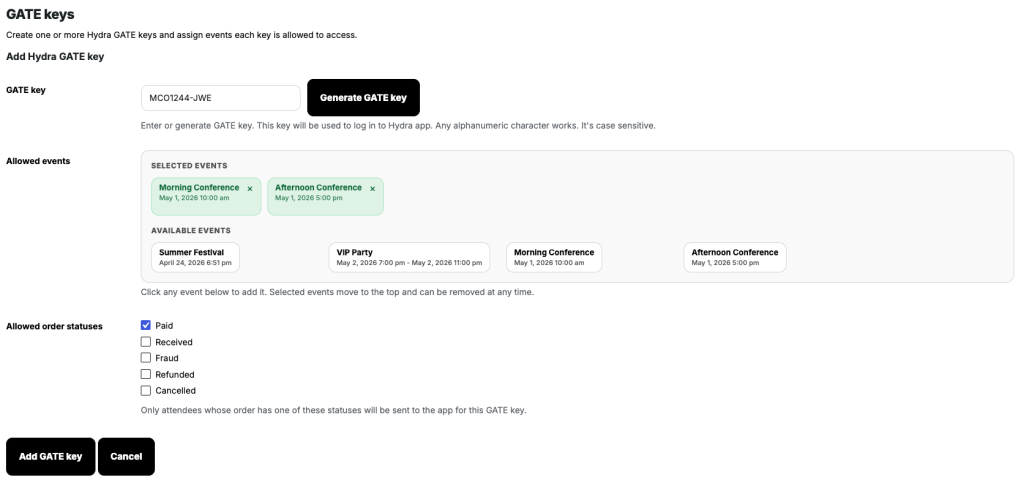
However, organizers can now exclude attendees belonging to specific order statuses, such as pending, unpaid or on-hold orders.
This gives significantly more control over what data actually reaches check-in devices.
If you’re using custom WooCommerce order statuses, get in touch and we’ll explain how to include those as well.
Affiliate access is now open
A few users asked whether they could recommend Hydra and receive a commission when somebody purchases a license.
The answer is now yes.
Affiliate access is available through the Earn section inside your Hydra Account.
One thing worth mentioning is that Freemius, our reseller platform, does not allow affiliate payouts below $100.
To help affiliates reach that threshold more easily, we’re offering a 20% commission on every new referred license sale.
Not bad for sharing a product you already use, right?
Thank you
Hydra is still in its early days.
Every bug report, every suggestion, every translation correction and every conversation directly influences where the product goes next. We’re building this together with the people actually using it.
Thank you for being among the first.
The paint is still drying.
More soon.