General
Overview
The General tab contains the core configuration required for Hydra Bridge to operate.
This is where you:
- select which ticketing system Hydra should use
- define a fallback security PIN
- review detected adapters and their availability
Hydra remains inactive until a valid adapter is selected.
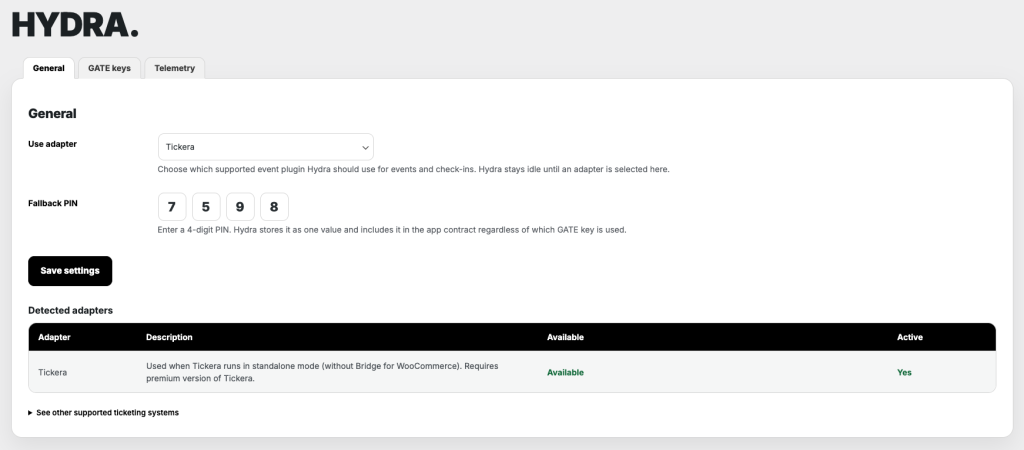
Use adapter
The Use adapter dropdown defines which supported event system Hydra will use for retrieving events, attendees, and processing check-ins.
Only one adapter can be active at a time.
If no adapter is selected, Hydra Bridge will not respond to app requests. The app will not be able to connect or load any data.
The available options depend on which supported plugins are installed and detected on the site.
Fallback PIN
The Fallback PIN is a 4-digit code used as a secondary authorization mechanism.
It is stored as a single value and is forwarded to the app on each login.
The app itself can set up a local PIN which can be used to lock the screen or lock the settings for example. However, in the unfortunate case that local PIN is forgotten, you’d be locked out forever if there wasn’t for this fallback PIN.
Fallback PIN is accepted the same way the local PIN is accepted and both can be used in any dialog box that requires PIN.
Save settings
Changes made in this tab are not applied automatically.
Click Save settings to store and apply the current configuration.
Detected adapters
The Detected adapters table shows which adapter is detected and active.
And if you’re curious which other ticketing systems are supported, you can click See other supported ticketing systems to see which are already supported and which are planned and in the pipeline.