Settings
Overview
The Settings screen contains all configuration options available in the Hydra Check-in App.
Settings can be accessed in two ways:
- from the login screen
- after a successful login
Depending on where you access them from, certain options may not be available. Some settings require an active connection and are only visible after login.
Settings are organized into categories. Each category controls a specific aspect of the app’s behavior, from how check-in works to what data is visible and how devices communicate.
This screen is not meant for constant interaction during events. It is where the system is prepared before things start.
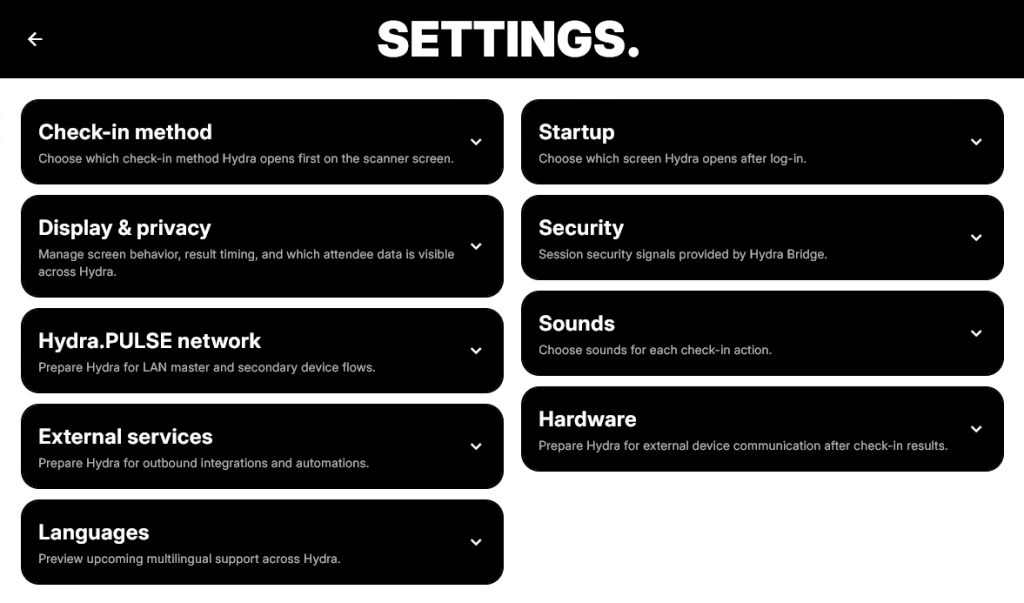
Settings structure
Settings are grouped into expandable sections. Each section can be opened to access more detailed options, which are documented separately.
The available categories are:
Check-in method
Defines how check-in is performed and which method is prioritized when entering the scanner screen.
This affects the initial workflow but does not limit other available methods.
Startup
Controls which screen is shown immediately after login.
This allows the app to open directly into the part of the workflow that matters most for a given setup.
Display & privacy
Manages what information is visible across the app and how certain UI elements behave.
This includes control over attendee data visibility and other display-related decisions.
Security
Handles session-level security settings provided through Hydra Bridge.
This includes mechanisms that protect access and enforce restrictions during app usage.
Hydra.PULSE network
Prepares the app for local network operation between devices.
This is used for scenarios where multiple devices operate together within the same environment.
Sounds
Defines audio feedback for different actions.
Used to provide immediate, non-visual confirmation during operation.
External services
Configures outbound integrations and automation hooks.
This is where Hydra connects to systems outside of its core environment.
Hardware
Used for configuring external devices that react to check-in results.
This includes defining communication behavior with connected hardware.
Languages
Preview and manage multilingual capabilities.
This section is intended for environments where multiple languages are required.