Telemetry
Overview
The Telemetry section provides a live overview of system activity.
It shows how the app is being used, how many check-ins have been processed, and which devices are currently connected. This is not configuration. Nothing here needs to be “set up.” It simply reflects what is happening.
If something feels off at the entrance, this is usually where you look first.
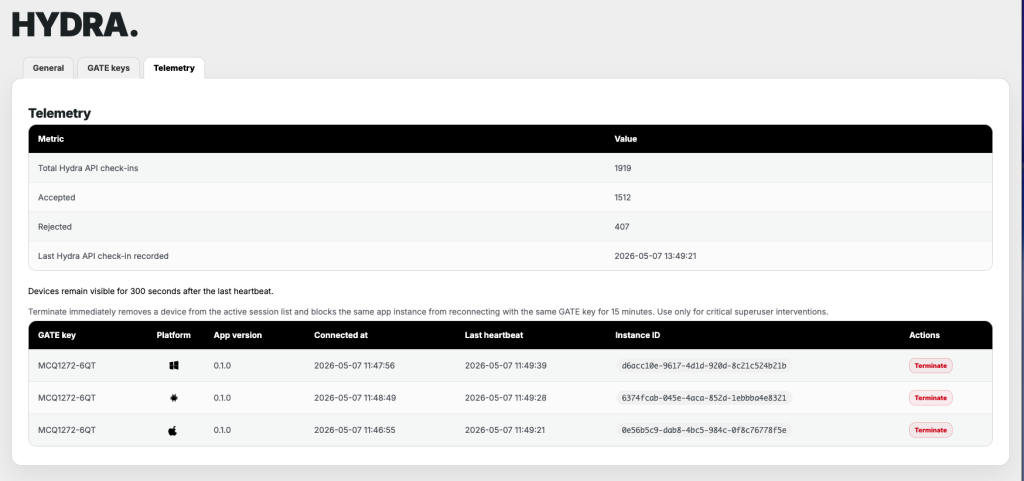
Metrics
At the top, you’ll find a set of aggregated values.
These include total API check-ins, accepted and rejected counts, and the timestamp of the last recorded check-in.
This gives you a quick sense of volume and flow. Whether things are moving, whether rejections are spiking, and whether the system is still receiving activity.
No interpretation layer is added here. The numbers are shown as-is.
Connected devices
Below the metrics is a list of currently active devices.
Each entry represents a running app instance connected via a GATE key. For each device, you can see:
- which key it is using
- platform (macOS, iOS, Windows, Android, Linux)
- app version
- connection time
- last heartbeat
- unique instance ID
Devices remain visible for 300 seconds after their last heartbeat. This avoids constant flickering in the list when connections are momentarily unstable.
If a device disappears, it’s either disconnected or hasn’t reported back within that window.
Terminate action
Each active device includes a Terminate action.
This immediately removes the device from the active session list and blocks that specific app instance from reconnecting with the same GATE key for 15 minutes.
This is not a soft disconnect. It is a forced stop.
Use it only when necessary. For example, if a device is behaving unexpectedly or, god forbid, it gets stolen so it needs to be removed from an active check-in flow. In a way, this is a final barrier for protecting attendee data privacy if device gets into wrong hands.